Introduction
The main point of this post is to share the good news that you can now install pytktable, a spreadsheet-like table widget for Python’s tkinter, together with everything it needs, with just one pip command:
pip install "pytktable[binary]"
You still need a Python with a working tkinter, i.e. one correctly linked to Tcl/Tk, which pip can’t install or fix. The installation instructions explain how to check it with one command, and how to fix the common problems.
Here’s an example of how the table looks on Windows 11:
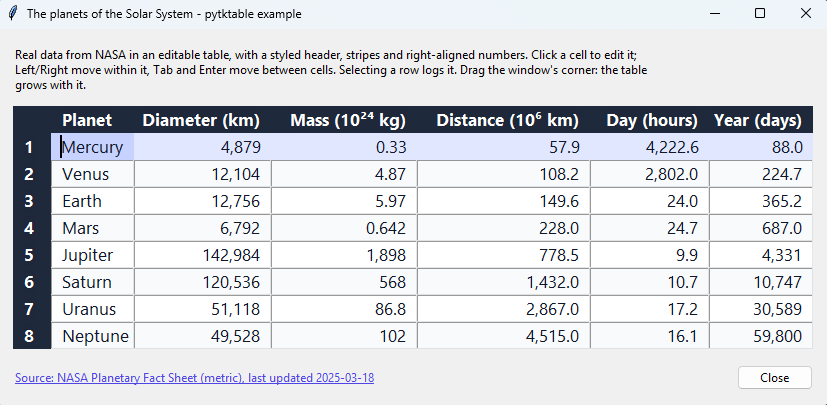
If you just want to use it, see the documentation. The code is in nbro/tktable (the PyPI package is called pytktable, because tktable was already taken by an unrelated package), and the binaries, with the platforms they support and where they come from, are in nbro/pytktable-binaries. If something doesn’t work as expected, please open an issue in the corresponding repo.
If you’re interested in more details of how I achieved this, you can continue reading this post1, where I describe the problems pytktable had and how I finally solved them in roughly 2 days, with the help of AI. I also share my experience with using AI to develop it.
Problems
I first discovered the Python wrapper library around the Tcl/Tk tktable widget roughly 11 years ago. It was written by Guilherme Polo in 2008, and already included in tktable’s SourceForge distribution in version 2.102. It immediately attracted my attention, because there was no table widget in tkinter, and I don’t think many people were aware of this wrapper library. If you’re interested in where Tcl/Tk, tkinter and the tktable widget come from, see the history in the documentation.
However, there were 2 problems with it:
- we couldn’t simply install it with
pip. We had to bring the file into our site-packages or project and do some tricks to import it; - to use it, we also needed to install the underlying Tcl/Tk widget. I didn’t know anything about Tcl/Tk, except that
tkinterwas built on Tk.
Goals
So, I created this repo in 2015 with these goals in mind:
- to make this wrapper more visible to the Python community,
- to upload it to PyPI,
- to not require people anymore to install the underlying Tcl/Tk widget separately or manually.
People then started to star the repo, so I believe they found it useful, and goal 1 was partially achieved, but my knowledge of Tcl/Tk and of how to upload packages to PyPI was limited, so I didn’t know well how to achieve goals 2 and 3. Then, since roughly 2017, I couldn’t dedicate time to this project, so the other 2 goals were never achieved, until this year, 2026, thanks also to the help of Claude Opus 5.5.
Execution
These are the main steps I took in 2026 to finally achieve these goals:
- I refactored the
tktablerepo to fix many problems, such as fixing bugs, adding types, adding tests, creating workflows, creating examples and adding docs - I created the
pytktable-binariesrepo to build binaries of thetktableTk extension from source, for multiple operating systems and architectures - I learned how to publish packages to PyPI properly, and published
pytktable, which now supportspytktable-binaries
The hardest parts were choosing which of the existing versions of the tktable Tk extension to build the binaries from, and for which platforms, and then testing that pip install "pytktable[binary]" really works on each of them.
Why and how I used AI
I decided to use Opus 5.5, because I had already used it at work, and I know it can speed things. It’s also the least annoying AI I’ve used for programming, much better than the free versions of AIs and the open-source models that fit on your computer, and, for now, I can afford it. Nevertheless, it still requires you to review almost everything, as it makes mistakes or can produce something you don’t want.
I used the Claude web UI. I uploaded all the code there, so the AI could have all the context, and specified the goal and requirements. Then we discussed, iterated, improved and refactored, I reviewed and provided feedback, and we iterated again, until we got to a solution I’m happy with. I didn’t use Claude Code, because I’ve not yet investigated all the ways to properly protect my computer (like sandboxes), although I am well aware of the fact that Claude and other AIs have settings that supposedly prevent them from doing certain things.
Conclusions
I don’t know if anyone will still use this wrapper library, but I hope that if anyone comes across it again, they can find the work I’ve done useful.
This small project lasted 2 days, even with the help of AI, because I worked on it constantly, but it could have taken much longer. I don’t recommend that people do this, as it’s unhealthy. There’s a lot of pressure to create now that AI enables everyone to do it, but maybe we should reassess this situation and care more about code quality and best practices, and value humans more.
I intend to continue to maintain the library and fix any issues if they come along, as well as try to use AIs more efficiently, e.g. with fewer manual steps, by trying Claude Code with its sandbox, which limits what the commands it runs can access.
Acknowledgements
First, I’d like to thank Guilherme Polo for developing the original wrapper and helping me and others with some questions.
I’d also like to thank Jeffrey Hobbs, who developed and maintained the tktable Tk extension for many years, and Roland King, who created its first version.
Finally, I’d like to thank Brian O’Hagan, whose version of tktable is used to build the binaries, and Bryan Oakley, from whom I learned a lot about tkinter.
-
This post was originally written by me, but it was fact-checked by Claude Opus 5.5, which also fixed some English mistakes and helped me reorganise and shorten it. ↩
-
See the license, which says “Copyright (c) 2008, Guilherme Polo”, and the commit where Jeffrey Hobbs added the wrapper to Tktable as
library/tktable.py, on 2008/11/15, the same day as the 2.10 release. ↩