Introduction
pytktable is a spreadsheet-like table widget for Python’s tkinter, and you can now install it, together with everything it needs, with just one pip command, something I’ve wanted to do since 20151:
pip install "pytktable[binary]"
Here’s an example of how the table looks on Windows 11 (see the documentation for this example and how to run it yourself):
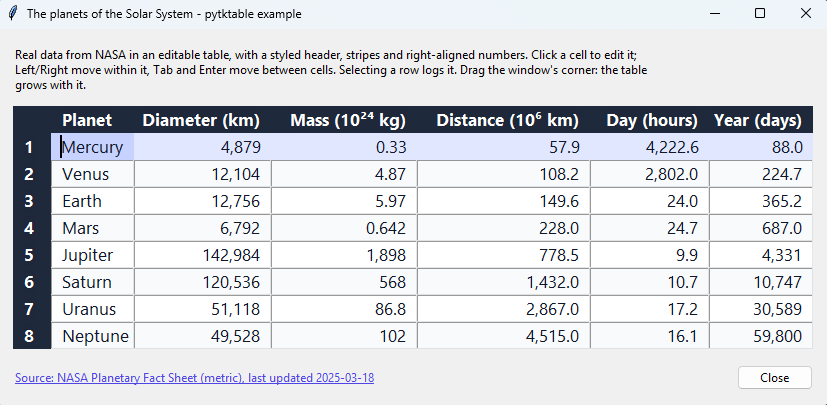
In this post, I tell the story behind it: where the widget comes from, why it took so long to be done, and how I finally did it in roughly 2 days, with the help of AI. I also share my experience with using AI to develop it, and my conclusions.
If you just want to use it, go directly to the documentation.
History
It’s been roughly 11 years since I first encountered the tktable widget for Python and Tcl/Tk1.
Tcl/Tk
I believe that many programmers and tech people aren’t even aware of Tcl, which is quite an old programming language designed by John Ousterhout which first appeared in 19882. Tcl stands for Tool Command Language, and Tk is its GUI toolkit, which Ousterhout also created: he started it in late 1988 and first released it publicly in 19913. Tcl is mainly known for Tk, so people often write Tcl/Tk.
Some people might know this language and especially the toolkit because Python’s famous integrated GUI toolkit, tkinter, which stands for Tk interface4, is essentially a wrapper around Tk.
tkinter was written by Steen Lumholt and Guido van Rossum. I couldn’t find when exactly they started it, but in June 1994 Guido van Rossum already announced a new version of it, so it’s at least from 19945. Python itself is older: Guido van Rossum started it in December 1989 and first released it in February 19916.
You can find the Tcl/Tk source files at SourceForge and GitHub also has an organization with mirrors of the repos here.
Tkinter
I first learned Python during my first year of university studies in 2014, or maybe I had already started to learn it a little bit 1 year before, so 2013.
One of the libraries that attracted me the most back then was tkinter. You can see on my Stack Overflow profile that the tags that I have the highest score on are in fact Python and tkinter. My first Stack Overflow post tagged with it seems to be this.
I think I became a mini expert in tkinter back in the day, thanks to the teachings of Bryan Oakley and others.
Nowadays people may not use tkinter much for professional GUIs, but I think it’s still a very useful library for teaching UI to new programmers.
tktable
The Tcl/Tk tktable widget was originally created by Roland King, who released its first version in 1994, as a table widget for Tk7. Jeffrey Hobbs then took it over, released version 1.0 in 19968 and maintained it for many years, so it’s mostly known as his work.
I believe this to be his or one of his GitHub accounts, whose profile picture seems to match this at the Tcler’s wiki.
The first version we can find on SourceForge to download as tar/zip is 1.82 (uploaded on 2001/06/229, although version 1.82 itself is from 199810), which is not the actual first version, as we saw. The latest version there, 2.10, dates back to November 200811. The project on SourceForge dates back to 2000/09/159.
Timeline
So, this is roughly the timeline of the main events:
- 1988 - John Ousterhout creates Tcl2, and at the end of the year starts Tk, which he first releases publicly in 19913
- 1989 - Guido van Rossum starts Python, which he first releases in 19916
- 1994 - Guido van Rossum announces a new version of
tkinter, written by Steen Lumholt and him, sotkinteris at least from 19945 - 1994 - Roland King releases the first version of the
tktableTk extension in September7 - 1996 - Jeffrey Hobbs releases
tktable1.0, and maintains it for many years8 - 2008 - Guilherme Polo publishes the first version of the Python wrapper of this extension1213
- 2015 - I share Guilherme Polo’s version on GitHub and do a small refactor and cleanup1
- 2026 - I publish
pytktable, which is a refactored/improved version of Guilherme Polo’s wrapper, to PyPI, which no longer requires you to install the Tk extension separately14
The problem and my goals
The problem
Now, let’s go back to my statement at the beginning of the history. I discovered the widget roughly around 20151. This assessment is based on my first commit to this branch, but it’s possible I had encountered it before.
Now, it’s important to be clear: what I first discovered was the Python wrapper library around the underlying Tcl/Tk tktable widget.
This wrapper was originally developed by Guilherme Polo I believe in 2008 (because that’s the year that appears on the original copyright12) and it was first included in tktable’s SourceForge distribution already in 2008 in version 2.10 (2008/11/15)13.
Given that tkinter didn’t have a built-in table, tktable attracted my attention. I wanted to learn how to use it, but I understood soon that using it wasn’t as easy as maybe I expected.
First, we couldn’t simply install it with pip. We had to bring the file into our site-packages or project and do some tricks to import it.
Second, to use it, we also needed to install the underlying Tcl/Tk widget. I didn’t know anything about Tcl/Tk, except that tkinter was built on Tk.
I wanted to do something about these problems.
My goals
So, I created this repo in 20151.
My goals were:
- to make this
tktablemore visible to the Python community, - to upload it to PyPI,
- to not require people anymore to install the underlying Tcl/Tk widget separately or manually.
People started to star the repo because I believe they found it useful. They probably knew me from Stack Overflow, which linked to my GitHub account.
So, goal 1 was achieved to some extent, but goals 2 and 3 were not yet. I wanted to solve at least problem 2, but I also didn’t dedicate the time to learn how to do it, and it was actually very easy, but actually the main reason I didn’t do it is because I wanted to solve 3 too, at the same time. I didn’t want to upload the package to PyPI without people having it work out-of-the-box.
For several reasons, I’ve not really worked with tkinter for so many years, since maybe 2017, an assessment I’m making based on the fact that I believe this to be my last SO answer that was tagged with tkinter.
Now, in 2026, nine years later, I finally fully reached my goals, in roughly 2 days, thanks also to the help of Claude Opus 5.5.
What I did in 2026
Steps
Here are the main steps of the 2026 event in the timeline above:
- I investigated how to publish a package to PyPI (with the pending Trusted Publisher approach)
- I refactored the
tktablerepo to fix many problems, such as- fixing bugs
- modernising the code and the packaging to use the latest Python approaches
- using only
tkinter’s public API, instead of private helpers that may change between Python versions - adding the command
python -m tktableto check whether Tktable can be found and loaded - adding code quality checks (formatting, linting, type checking, secret scanning) that run on every commit
- creating test and release workflows
- updating and releasing documentation
- creating more examples of how to use the table and its features
- adding tests
- adding types
- I published the first version of
pytktable0.1.0 to PyPI, which still requires you to install the Tk extension separately and manually, although the documentation already explains how to do it on the OSes that provide it (Debian, Ubuntu, macOS and Windows) - I published another version 0.2.0 with the type hint additions
- I created the
pytktable-binariesrepo to build binaries for multiple OSes and platforms of thetktableTk extension from source - I published
pytktable0.3.0, which now supports the use ofpytktable-binaries
Name of the package
I called the pip package pytktable because there was already an unrelated package on PyPI called tktable15 and I think pytktable is actually a better name for the wrapper, so we distinguish it from the original Tk one. The repo is still called tktable now, though.
AI-assisted software development
Subscription and time
On 2026/11/03, after having decided to buy the Claude Pro subscription (20 dollars per month, as I’m paying monthly, so that I can cancel it at any time), to try it and see if it’s worth it (I had already used Opus 5.5 at work, but I wanted to see if paying for it myself is worth it, which is something I’m still assessing), until I go bankrupt and become a rolling stone, I decided to finally solve all the original problems regarding the Python tktable wrapper library.
I uploaded it to PyPI first without the binaries and then on 2026/11/04 with the binaries14.
Now, it took a lot of persistence to actually finish this in 2 days. I am gonna tell you that, even with AI, it could just as well have taken 1 week or more to do it, depending also on how much time in a day you can dedicate to it.
Why I didn’t use Claude Code
Anyway, I didn’t use Claude Code. I still don’t want to install a program on my computer that can potentially execute very dangerous commands, share or read any file (including confidential ones), even if the settings say that my data supposedly won’t be read or used for training, or that it won’t execute the commands. I still can’t fully trust AIs, not even the least obnoxious ones, like Claude Opus 5.5, which actually makes many mistakes.
To be fair, I’ve not yet investigated all the approaches to use Claude Code safely, e.g. in sandboxes, in containers or virtual machines, etc. The next thing would be to try these approaches, maybe in a clean computer, where the risk of doing things wrong is small.
How I used Claude
I just used the Claude web UI. I uploaded the code there so it has the full context, which is very important if you want to get things right with AI (and only powerful AIs can actually keep track of all context, like a repo, say for several iterations), I explained my goal and requirements, we discussed, iterated, improved, refactored, I reviewed, I provided feedback, and iterated again, until I think we got to the solution I am happy with.
Claude on the web already works like an agent, i.e. it reads files, executes commands, etc., so it’s not that we really need Claude Code, which would just make certain things easier, like not having to upload zips with the code and re-sync files. But, for now, I prefer to waste some time doing this rather than risk sharing anything with these AIs.
Challenges
The main problems I faced were:
- which repo and codebase to use to build the binaries
- understanding and deciding which platforms to support the binaries for
- how to publish to PyPI correctly, as I was not super familiar with it, although I already do it for my other package,
andz - creating the documentation and new examples for
tktableand reviewing - AI iteration and review, which requires a huge amount of persistence
- testing that the process works and we can now use pip to install the wrapper
AIs
Opus 5.5
Opus 5.5 speeds up coding, planning and learning in a significant way, provided that you are persistent and have an analytical mind and are skeptical about the AI’s statements, and don’t just accept what the AI writes or proposes, but reason with it to create the best solution, iterate until you get it perfect, because now speed is not a big issue, resources and money to buy the subscriptions maybe are though.
Free and open-source AIs
I believe that all free AIs are very stupid and obnoxious compared to Claude Opus 5.5, which is the only AI I’ve used that makes me enjoy programming with AI or doesn’t make it as annoying.
The free AIs maybe can be helpful for simple things, like getting some git commands, learning about basic stuff, writing a very simple bash or Python script, but they fail easily on a real project, which requires more memory and context-awareness. They soon become very obnoxious because they don’t follow all your instructions, they keep forgetting things you already stated multiple times, they implement a bad solution, etc. So, yes, free AIs, like free Gemini, ChatGPT, etc., they are quite stupid and obnoxious.
The open-source ones that can live on your normal computer are even worse, they are not even useful. People keep coming up with these so-called agents to interact with different AIs and some advertise their agents (which is basically just a chat interface, which often is broken or doesn’t work well, to LLM backends) as tools that can use open-source free LLMs, but these free open-source LLMs that fit on your 16 or 32 GB RAM computer are very, very stupid. It’s basically garbage.
I’ve used different AI models, from many free ones, to the paid ChatGPT, Claude and Gemini. I believe that the only ones that are not extremely stupid are Opus 5.5 and the paid ChatGPT (I don’t remember the version). There might be other versions that are also not that stupid, but I didn’t use them.
I believe that using the free AIs for actual reasoning leads to mental health issues very quickly and companies should shut them down immediately. Or people should simply not use them, or not use them with the idea that they are even remotely intelligent, which is a ridiculous supposition.
Result
Repos
You can find the repos here:
- https://github.com/nbro/tktable
- https://github.com/nbro/pytktable-binaries
Installation
pip install "pytktable[binary]"
is the only thing you need to start using the Python wrapper library to create tables on the most common Windows, macOS and Linux distributions and architectures.
On Linux, you may also need your distribution’s
tkinterpackage, e.g.python3-tkon Debian and Ubuntu. See the installation instructions.
You can check that everything works with
python -m tktable
Supported platforms
The binaries are available for these platforms, and each of them contains tktable compiled for both Tcl/Tk 8.6 and 9:
| Operating system | Architectures | Tested on |
|---|---|---|
| Linux with glibc (most distributions) | x86_64, ARM64 | Ubuntu 24.04 (x86_64 and ARM64), Fedora |
| Linux with musl | x86_64, ARM64 | Alpine (x86_64 and ARM64) |
| macOS 11 or newer | Intel, Apple silicon | macOS 15 (Intel and Apple silicon) |
| Windows | x64, x86 (32-bit), ARM64 | Windows Server 2025 (x64 and x86), Windows 11 (x64 and ARM64) |
Python and Tcl/Tk versions
pytktable supports Python 3.11 to 3.15. Which Tcl/Tk version a Python uses depends on how it was installed, e.g. on Windows, with the python.org installers:
| Python | Tcl/Tk with the python.org installers for Windows |
|---|---|
| 3.11, 3.12, 3.13 | 8.6 |
| 3.14, 3.15 | 9.0 |
On Linux, Python uses the Tcl/Tk of the distribution, e.g. 8.6 on Ubuntu 24.04 and 9.0 on Fedora 45. The binaries work with both, so you don’t need to care about this.
Usage
For code examples that show how to create and configure tables with pytktable, see the usage page of the documentation.
Binaries
The binaries are created in a separate repo. I had never published a package to PyPI that required binaries, so during this process I also learned how to do it.
Python packages are distributed as wheels, i.e. zip files that pip installs. A package without binaries, like pytktable, needs a single wheel that works everywhere, while a package with binaries, like pytktable-binaries, needs one wheel per operating system and architecture, because the compiled code is different for each of them.
I believe that this solution to separate things is a good one because it doesn’t clutter the original repo much. It’s also what other libraries do, e.g. psycopg, the PostgreSQL adapter for Python, whose psycopg[binary] installs its compiled part from a separate package, psycopg-binary16.
Where the binaries come from
The binaries are created from a release of this version of the original Tcl/Tk’s tktable widget https://github.com/bohagan1/TkTable by Brian O’Hagan, which seems to be the only one that is still being worked on and maintained. Specifically, the first pytktable-binaries 2.12.2 currently uses the latest published version by Brian O’Hagan17.
There are other ones, which are more recent than the versions on SourceForge:
- https://github.com/chpock/tktable
- https://github.com/wjoye/tktable
More info
For more info, please see the documentation on the repos and the official pytktable documentation: https://nbro.github.io/tktable/
pytktable is currently at version 0.3.0.
For details of changes wrt the original by Guilherme Polo, see https://github.com/nbro/tktable/releases.
Please try it, and if something doesn’t work as expected, open an issue in
- nbro/tktable, for the Python wrapper, or
- nbro/pytktable-binaries, for the binaries.
Conclusions
I don’t know if anyone will still use this wrapper or table, because nowadays there are so many options. This work should probably have been done immediately in 2008, but still, better late than never, and I hope that if anyone comes across it again, they can find this work useful.
This small project that lasted 2 days, although I still intend to maintain the library and fix any issues if they come along, also showed again that with the most powerful AIs, you can get work done quicker if you are very persistent and patient.
However, I actually don’t recommend that people do this. I think it’s very unhealthy, because we humans are probably not meant to do something for 8 hours straight. Using AIs to develop code is like drinking 10 Red Bulls in 1 day to get anything done or smoking 3 joints before an exam so you can calm down.
A tool by itself maybe is not evil. It’s how we use it. AI mostly speeds up your process. It doesn’t really do anything you couldn’t come up with if you thought about it for some time. However, humans are not as fast as AIs at computing.
Moreover, if you want to get things right with AIs, even Opus 5.5, you need to constantly review what the AI does, iterate a lot, and this is actually stressful.
Now, with AI, there’s a lot of pressure to produce products, because AI enables it even for people without any knowledge of programming. But we should probably reassess this pressure, because, so far, it’s not that we have really created anything revolutionary with AI. We just enabled things to be done more quickly.
Hopefully, things will balance out in society: this pressure to produce with AI, without caring about code quality or anything else, and to be a product developer or the single-person CEO of a 1-person company, will fade away, and the sooner we understand that humans are still needed to create valuable and lasting products and software, the better. Just because you can do it, it doesn’t mean you should do it.
Next steps
The next steps for me would be to try to use AIs more efficiently, i.e. to use fewer tokens and share less code, while still guaranteeing the same security.
Acknowledgements
I’d like to thank first Guilherme Polo for developing the original wrapper and helping me and others with some questions.
I’d also like to thank obviously Jeffrey Hobbs, who developed and maintained the tktable Tk extension for many years, and Roland King, who created its first version.
Finally, I’d like to thank Brian O’Hagan, whose version of tktable is used to build the binaries, and Bryan Oakley, from whom I learned a lot about tkinter.
This post was originally written by me, but it was fact-checked by Claude Opus 5.5, which also fixed some English mistakes and made small reorganisations and additions.
-
My first commits to nbro/tktable are from 2015/03/28, starting with the initial commit and the one that added the wrapper class by Guilherme Polo. ↩ ↩2 ↩3 ↩4 ↩5
-
See Tcl on Wikipedia and the Tcl chronology on the Tcler’s wiki, which says that Ousterhout first used Tcl in 1988 and presented it at the USENIX conference in 1990. ↩ ↩2
-
See Tk on Wikipedia. According to the Tcl chronology, Ousterhout began Tk in late 1988 and presented it in 1991. ↩ ↩2
-
See the
tkinterdocumentation. ↩ -
See the
tkinterdocumentation of Python 3.9, which says “Tkinter was written by Steen Lumholt and Guido van Rossum”, and Guido van Rossum’s post of 1994/06/28, where he announces “a new version of Steen Lumholt’s Tk interface”. ↩ ↩2 -
See Why was Python created in the first place? in Python’s FAQ: Guido van Rossum started it during the 1989 Christmas holidays and posted it to USENET in February 1991. ↩ ↩2
-
Roland King’s first release is dated 1994/09/22 in the history of Tktable (imported from the original SourceForge CVS repository into bohagan1/TkTable), whose README still says “Conceptually based on Tk3 table widget by Roland King”. ↩ ↩2
-
tkTable v1.0 is dated 1996/12/19 and was committed by Jeffrey Hobbs. The README says “Copyright 1997-2002, Jeffrey Hobbs”. ↩ ↩2
-
I took the SourceForge dates from the SourceForge pages linked above, but they weren’t independently verified. ↩ ↩2
-
The tktable-1-82-0 tag is dated 1998/04/03. ↩
-
The tktable-2-10-0 tag is dated 2008/11/15. ↩
-
See the license, which says “Copyright (c) 2008, Guilherme Polo”. ↩ ↩2
-
Jeffrey Hobbs added Guilherme Polo’s wrapper to Tktable as
library/tktable.pyon 2008/11/15, the same day as the 2.10 release. ↩ ↩2 -
See the releases of pytktable: 0.1.0 (2026/11/03), 0.2.0 and 0.3.0 (2026/11/04), and the release of pytktable-binaries 2.12.2. ↩ ↩2
-
See tktable on PyPI. ↩
-
See the installation documentation of psycopg and its
pyproject.toml, where thebinaryextra depends onpsycopg-binary. ↩ -
See the tags of bohagan1/TkTable, where
tktable-2-12-2is the latest one. ↩